|
Home networking benefits
• PCs share a common
internet service
• PCs have simultaneous
high speed internet access
• Printers can be shared
• Documents, pictures,
etc. can be shared
• Hardware unique to one
PC can be shared
• Easily connect up to
24 computers
Business
networking benefits
• PCs share a common
internet service
• PCs have simultaneous
high speed internet access
• Work stations can
share common printers
• Documents, pictures,
etc. centralized on a server
• Hardware
unique to a PC can be shared
• Server and
remote PCs automatically backup files
•
File/folder access can be limited to specified users
• Network
resources can be limited to specific hours
Networking
basics
The first step in setting up a wired or wireless network is to plan out how the network
components are to communicate. This is done by developing a connection
diagram which shows all the interconnections. The diagram must show a
central point such as a router, switch or hub which will be responsible for
receiving and transmitting information over the network. Each computer or
network component should be shown and how it is going to interconnection
with the central point. A simple network connection diagram is shown
in the example below.
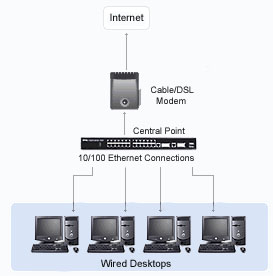
Each network computer must be equipped with what is called a
10/100 Network Interface Card (NIC) through which it communicates to the
central point.
Most PCs today already have a 10/100 Ethernet NIC pre-installed.
The central point is responsible for maintaining an
internal list of all the computers which are connected to it. When a network
computer requests to connect to a another computer within the list, the
central point connects the two computers and begins transferring data between
them. The central point is also typically connected to the internet through
a cable or DSL modem. This allows all network computers to share a single
high speed internet connection through the central point.
Setting up a wired network obviously requires wires to
be routed through walls and be connected between each computer and the
central point. Connections can be as much as 300 feet apart in a typical
10/100 Ethernet network. Once all are connected, the central point's
internal communications protocols are configured for the network. Then each
computer is individually configured with the same communication protocol and
configured for what components and files are to be shared. From that point
on, each computer on the network will be able to see every network
computer's files, folders and printers which have been designated as
shareable. Additionally all network
computers will be able to access the internet at the same time without any
reduction in speed.
|

