|
LSI Email Account Access via the Internet
You can access your LSI email account from any place using the web mail internet panel. To do so go to www.webmail.perfora.net and enter in your full email address and password. If you do not remember your password then call me to reset it to something you can remember. 858.695.1177
Once accessed, you must remember that the web mail panel is operated directly from your email server and has nothing to do with your local PC. This means any email sent or deleted from the panel will NOT show up in your email folders on your PC.
Spam Filter Operation Should there be an email caught in the spam folder that you wish to retrieve and also alter settings so it will not be stopped in the future perform the following.
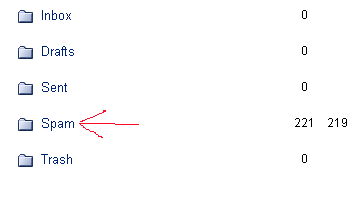
1. Click on the Spam folder on the left to see all the emails held in the folder.
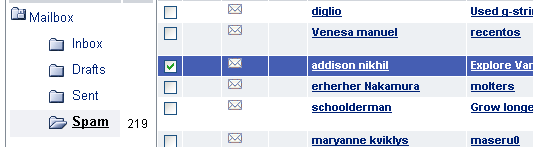
2. Check the box next to the email you wish to change settings for. Only check one box at a time.
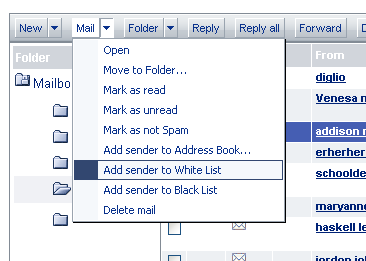
3. Click on the Mail pull down and select Add sender to White List. This will add the sender to an approved list and will prevent any future emails from this person being considered as spam.
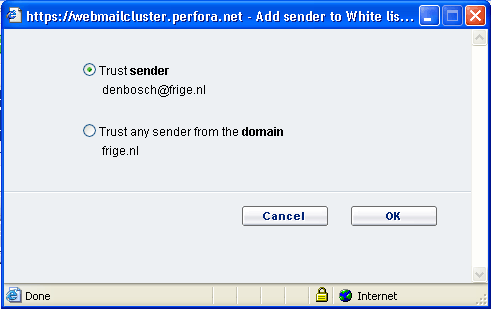
4. In the popup window you have to make a decision on how the email will be added to the white list. Selecting Trust sender will allow only emails from that specific person to pass through the spam filter. Selecting Trust domain will allow ANY emails from any person using the company's email address or domain name to pass through the spam filter.
5. And finally the email has to be moved from the spam folder to the Inbox so it can be downloaded by your email program. To do this, leave the email checked and click on Not Spam at the top. This will move the email from the spam folder to the Inbox and the next time Outlook does a Send/Receive, the email will be download.
Repeat any of these steps for each email you wish to retrieve.
|